SPAX HR
Designing a self-service HR portal for employees
Spax HR gives employees direct access to their documents and leave, without going through HR. In testing, a payslip is retrieved in 38 seconds, instead of two days of emails.
- YEAR
- 2025
- DURATION
- 10 weeks
- ROLE
- UX/UI Product Designer
- FORMAT
- Mobile-first PWA · Concept project
THE PROBLEM
For a payslip, a leave balance or a certificate, employees write to HR and wait: an email, the wait, a reminder. On the HR side, these repetitive requests take up the time that support work needs.
THE SOLUTION
A self-service portal, limited to 5 sections, that people adopt without training.
CONTEXT
Understanding the context before designing
Spax HR is a concept project: a portal for employees of SMEs, designed mobile-first (PWA). The interviews and tests were carried out with employees and HR staff in Cotonou.
The problem wasn't a lack of features, but depending on the HR department for simple tasks.
“I don't want to bother HR for so little.”
My role: UX/UI Product Designer, working alone on the project for 10 weeks. I led the interviews, the MVP scoping, the competitive analysis, the architecture, the design system, the interfaces and the testing of the portal.
RESEARCH
What the research showed
I ran 30-minute semi-structured interviews with 8 employees (staff and managers, aged 26 to 52) and 3 members of the HR department. Three findings stand out:
The barrier isn't technical, it's psychological: people don't dare “bother” HR, or do it on their own.
“I don't want to bother HR for so little.”
Nobody knows their balance: people recount their leave by hand, in a personal spreadsheet.
“I never know how many days of leave I have left.”
A request, once sent, disappears: with no visibility on its progress, people send reminders.
“I sent an email two days ago, still nothing.”
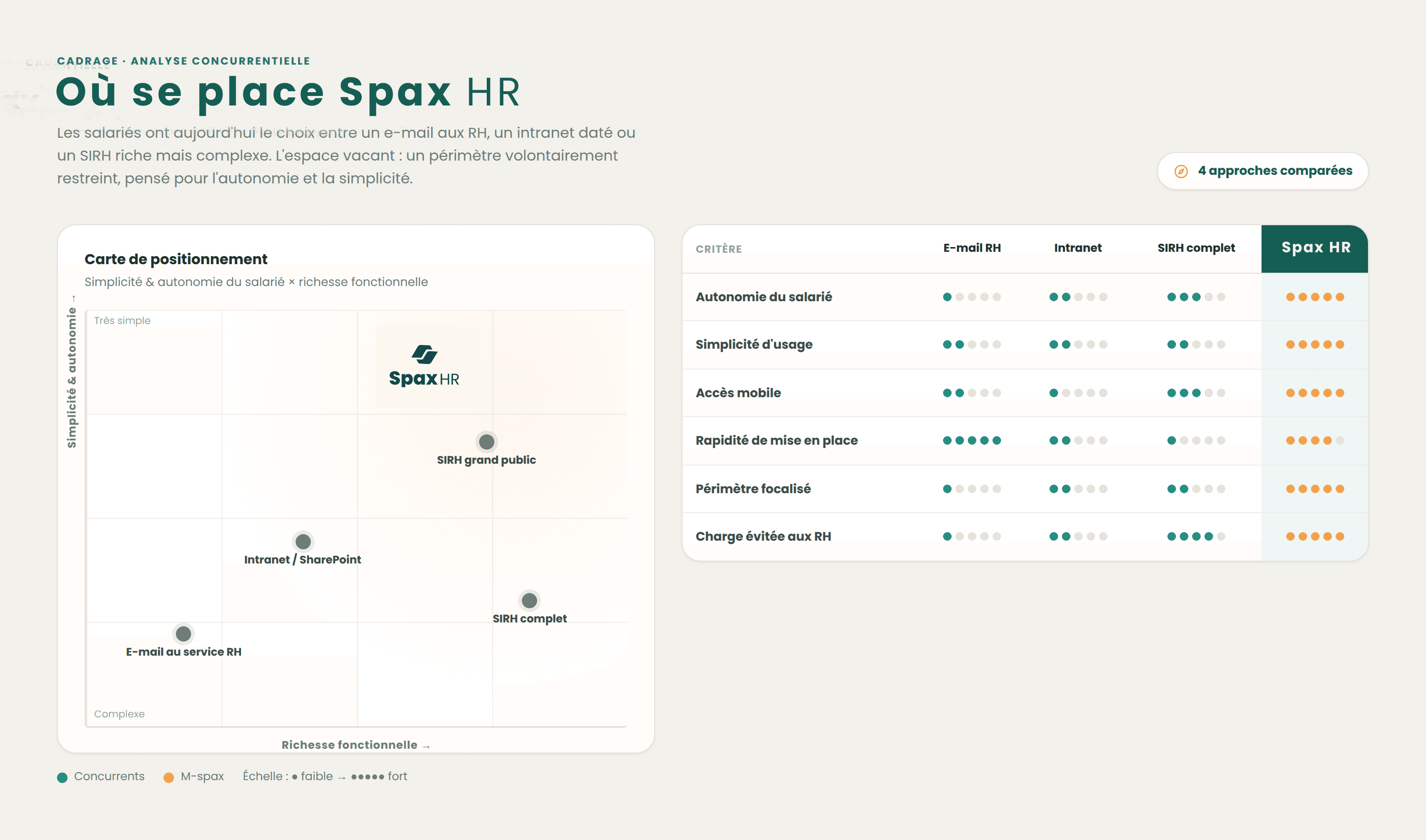
Competitive analysis: the positioning
The gap: a deliberately narrow scope, mobile-first, designed for autonomy and simplicity rather than completeness. That is Spax HR's positioning.
DEFINE
Bringing the user to life
To make the research tangible, I synthesized the needs into a persona, her current journey and “How might we” questions.
Persona: Fifamè, project officer

Fifamè Adjakossa
Project officer · 34 years old
“I don't have time to wait two days for an HR reply about a document I should be able to get myself.”
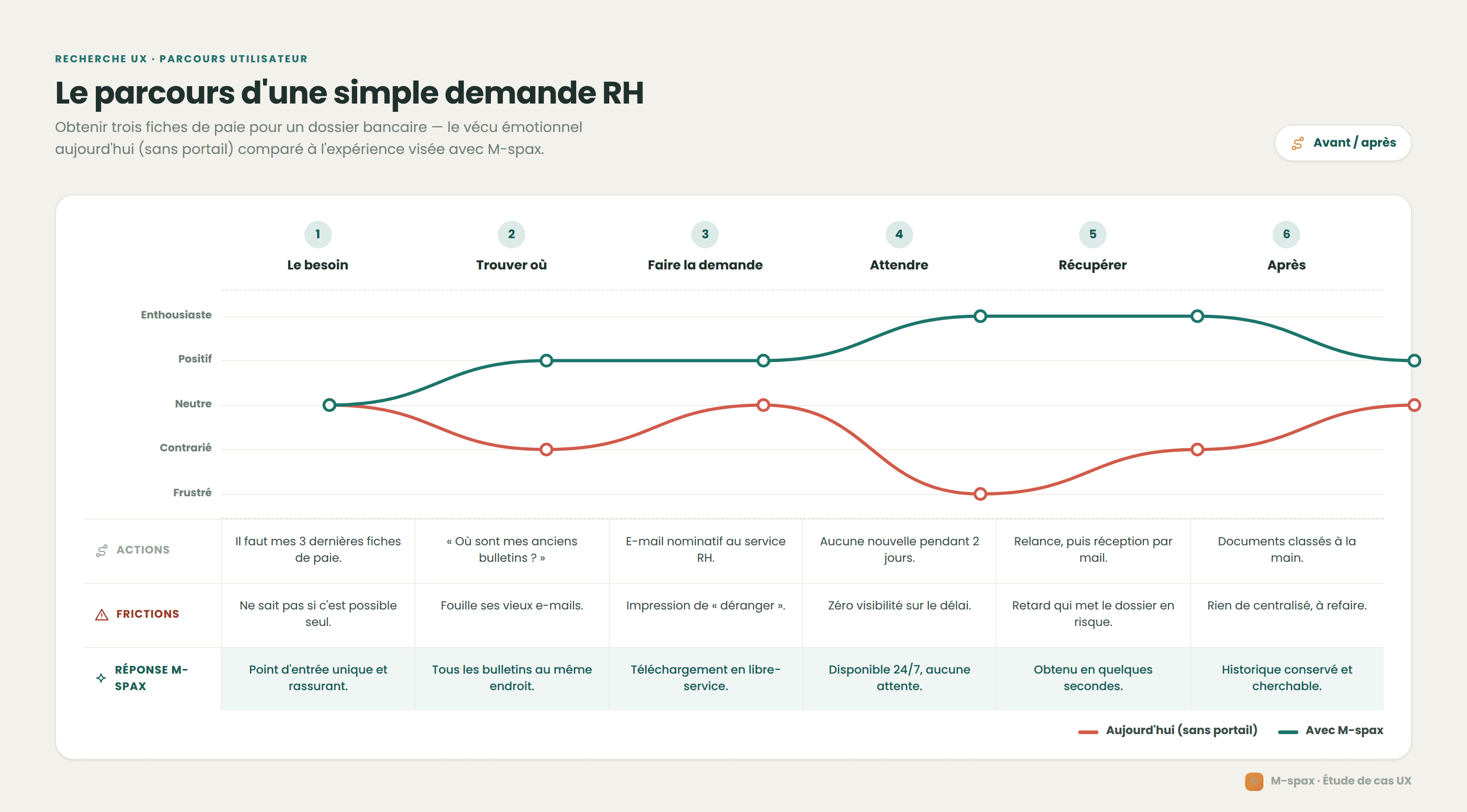
Her journey today
Fifamè needs her last three payslips for a loan application. The employees interviewed all describe the same loop.
- 1
Monday · the email
She writes to HR for her last three payslips.
- 2
Tuesday · the wait
No reply, and no way of knowing where the request stands.
- 3
Wednesday · the reminder
She sends a reminder, embarrassed to “bother” them for so little.
- 4
Thursday · the reply
Two payslips out of three. The loan application is still waiting.
How Might We
How might we enable Fifamè to get her documents and book her leave on her own, in under a minute and without manual calculation, while knowing she is allowed to do so?
IDEATION
Structuring a deliberately small MVP
Hence the product bet: an MVP that people adopt without training, focused on the most frequent tasks, with everything else postponed.
HYPOTHESIS
If we give employees a clear and reassuring self-service portal, focused on the 4 most frequent tasks, then they will complete these tasks on their own, which will reduce repetitive requests to the HR department.
Features
The MVP's 5 sections, and what is left for later.
In the MVP
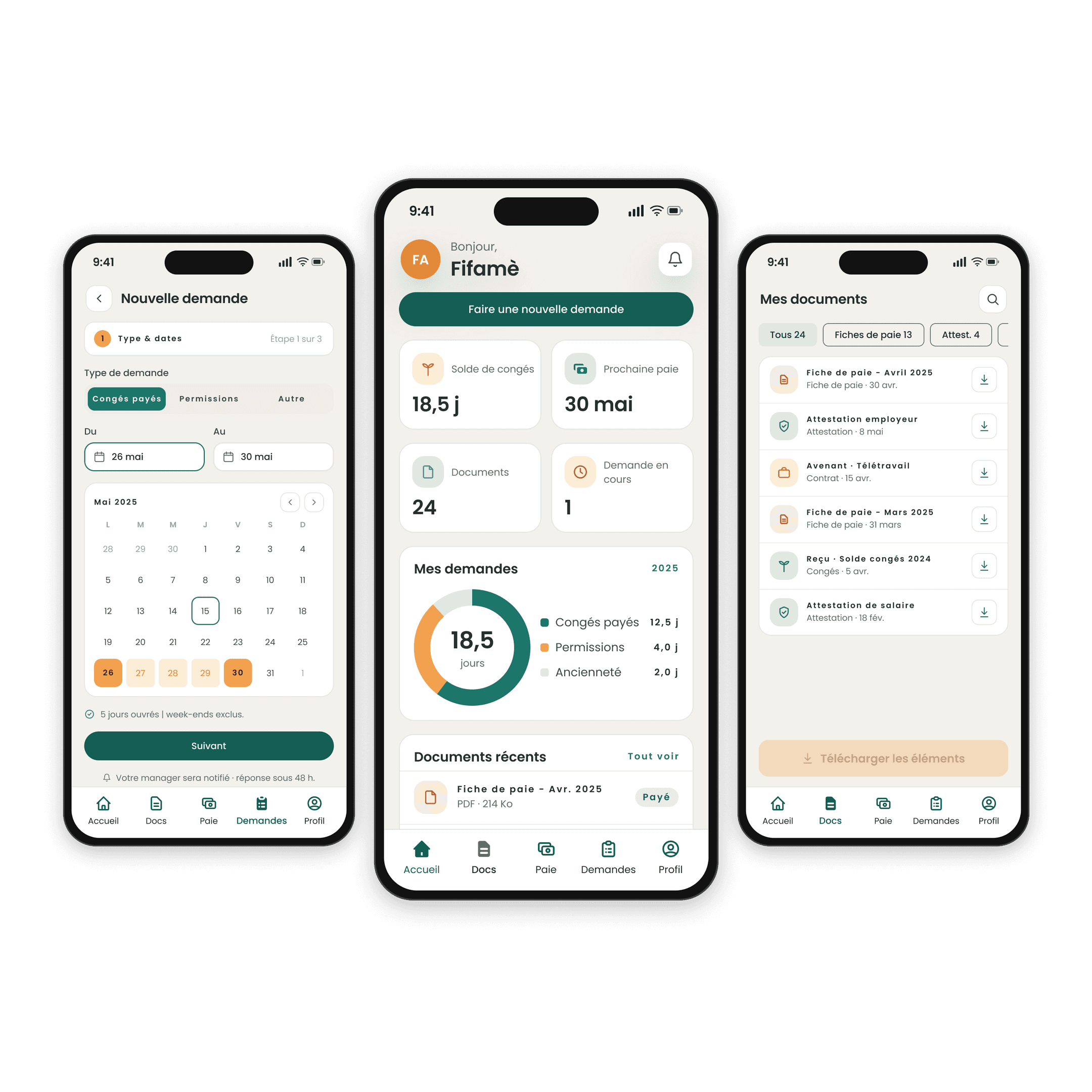
- Home: dashboard, up-to-date leave balance and notifications
- Documents: payslips, certificates and contracts, downloadable at any time
- Pay: this month's payslip and payslip history
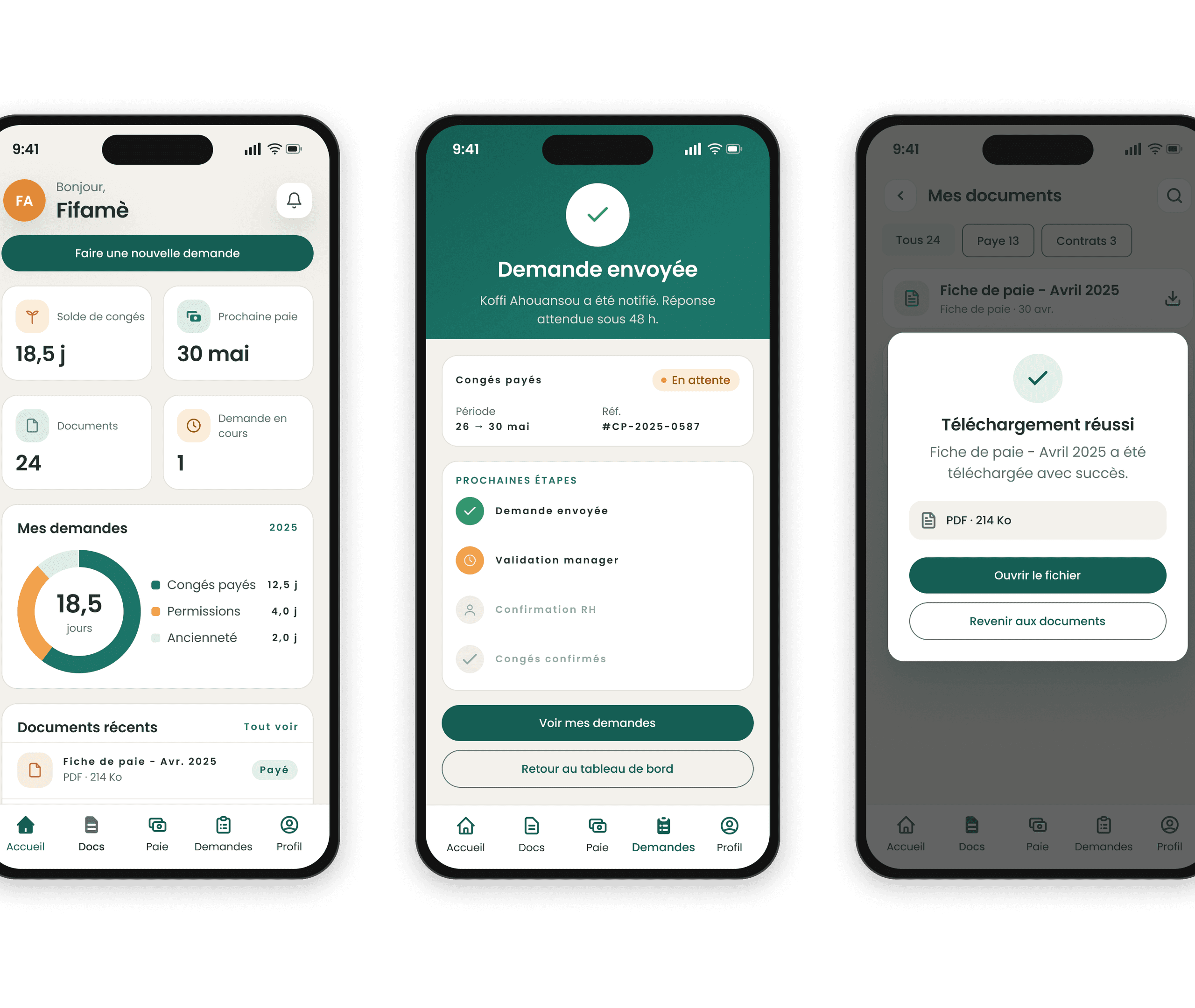
- Requests: 3-step leave request with a summary, status tracking and reminders
- Profile: personal information, settings (SSO login, two-factor authentication, push notifications, leave reminders), help and FAQ
Outside the MVP, for later
- Approval workflow on the manager side
- Integration with the payroll software
- Offline mode
- Multilingual version and dark mode
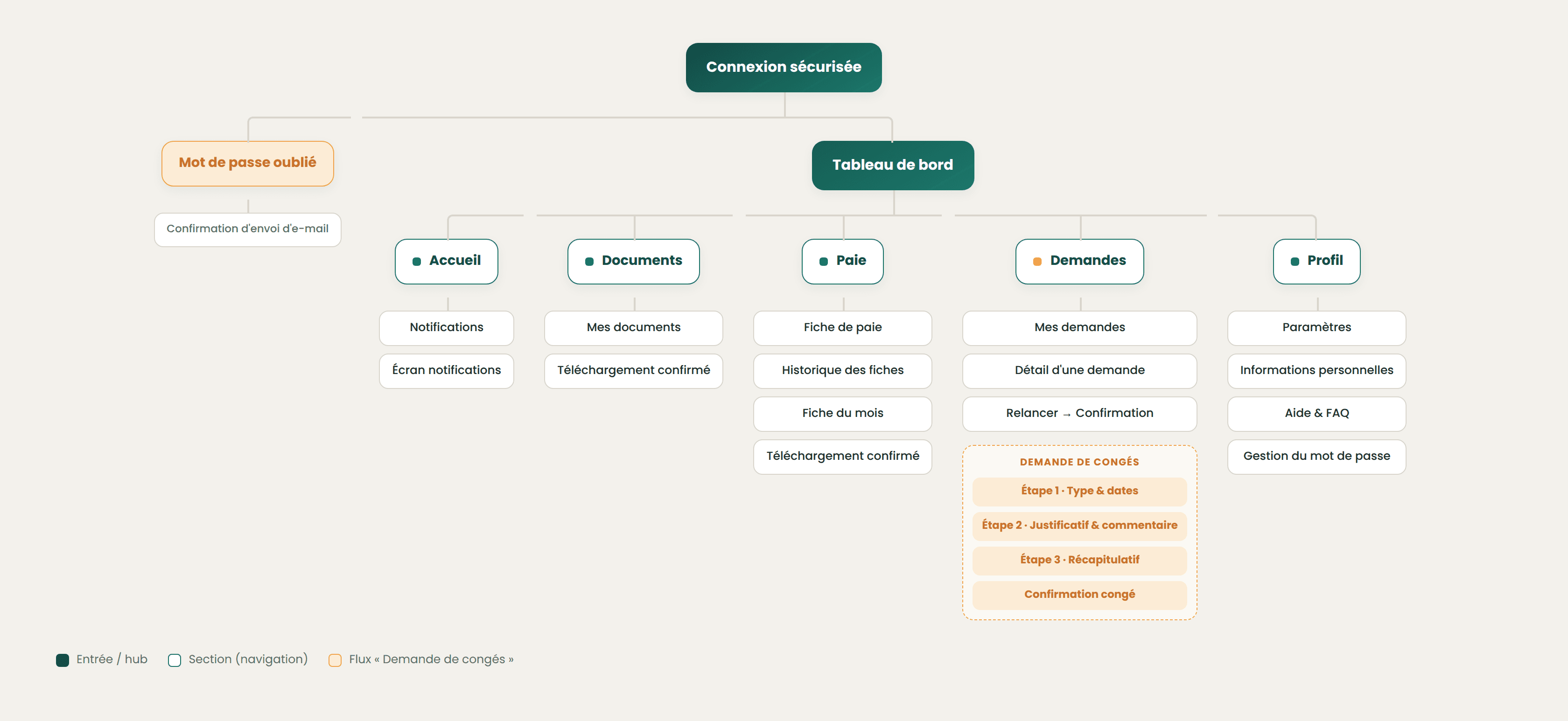
From features to architecture
After login, a dashboard gives access to the 5 sections, never more than two levels before the action. The leave request follows a 3-step flow: type and dates, supporting document and comment, summary.
DESIGN
3 design decisions
Each choice answers a research finding:
- 1
Fewer features, more trust.
What we observed
Employees were afraid of “doing it wrong” in an HR tool.
What I decided
I limited the MVP to 5 sections, never more than two levels before the action, and postponed everything else.
- 2
The balance, calculated for you.
What we observed
Employees recounted their leave by hand before making a request.
What I decided
The balance is shown before the request and updated live; working days are counted automatically.
- 3
A summary before sending.
What we observed
Sending a request to your employer is stressful.
What I decided
A clear summary (dates, days deducted, approver, next step) reassures before submitting.
From wireframes to high fidelity
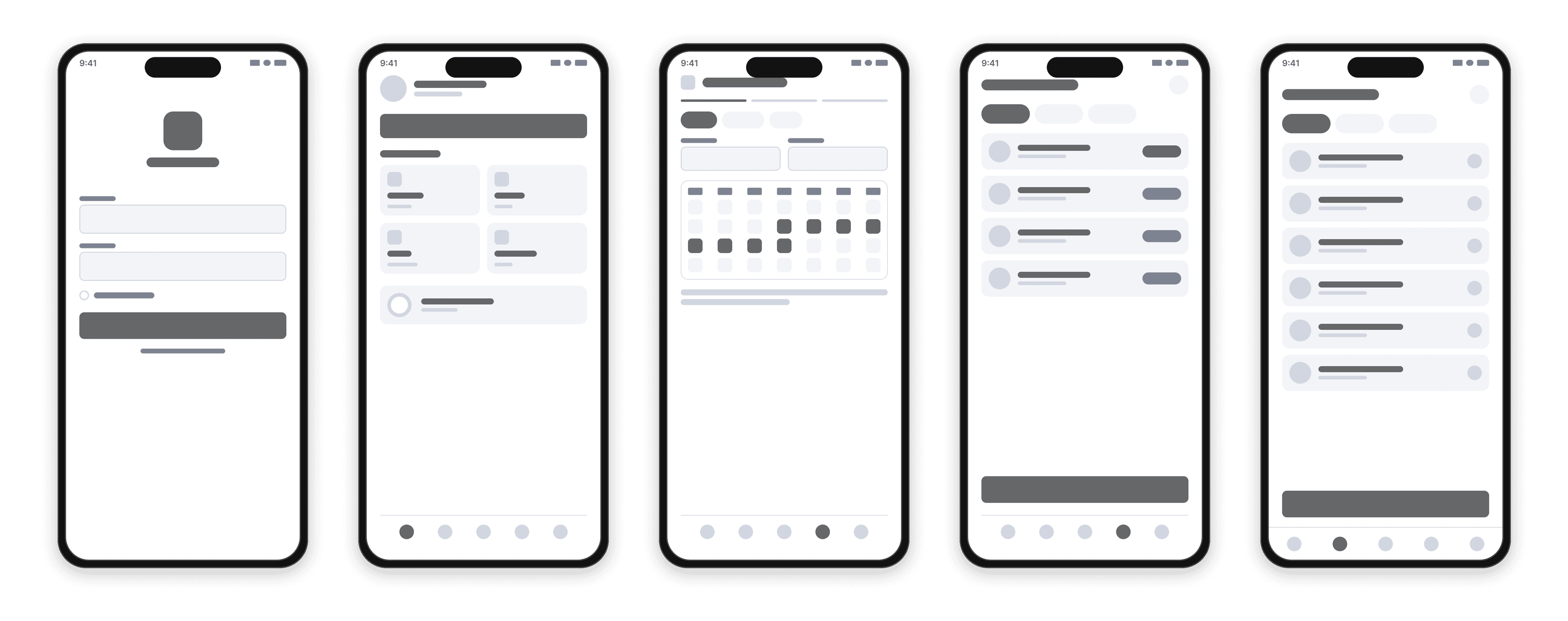
The wireframes of the 17 mobile screens set the hierarchy and the journeys before the visual work: a 5-item tab bar, a 3-step leave request, documents downloadable from a list.
A visual design driven by a design system
So that five sections read as a single product, every screen relies on the same system: two-layer tokens, a type scale and a component library.
Colors
- Primary · brand/700#155E54
- brand/900#0E3B36
- brand/500#268E7F
- brand/200#B8D6CF
- brand/50#EFF6F4
- Secondary · accent/600#E28A38
- accent/500#F2A24D
- accent/100#FCECD6
- Surface#FAF8F3
- On-surface#20302D
- Success#2F9E68
- Danger#D15B4C
Components
- Button
- Text Field
- Card
- Chip
- Badge
- FAB
- Outline 24 and solid 20 icons
Rules
- Two layers of tokens: primitives, and M3 semantic roles ready for light and dark mode.
- brand/700 for interactive elements, 100 to 200 for backgrounds, 900 for text on light backgrounds.
- Orange is reserved for secondary actions, badges and anything that must stand out from the teal.
- Each status has three tokens: base for the icon, bg for the background, ink for the text.
- Spacing from 2 to 40 px and radii from 0 to 999 px, all as Figma variables.
TESTING AND ITERATIONS
Validating and improving with users
I put the prototype in the hands of 8 employees, in moderated in-person tests and unmoderated remote tests on Maze.
Participants were asked to:
- Find and download their latest payslip
- Check their leave balance
- Book 5 days of leave
- Download an employment certificate
One problem observed led to the following iteration:
- 1
Saying what happens after sending
What got stuck
The leave request summary didn't say what would happen after sending.
What I changed
It now shows the remaining balance after the request, the approver and the response time.
RESULTS
Results on the prototype
What was measured in testing is kept separate from what remains a projection.
Success
7 out of 8
7 participants out of 8 completed the 4 tasks without help.
Payslip
38 s
On average to retrieve a payslip, compared with about two days by email today.
SUS score
84/100
Indicative, across 8 participants.
Projection, not measured
If the portal were deployed: 50 to 60% fewer repetitive HR requests in the first 3 months. This is the goal set with HR before the design work, not a measurement.
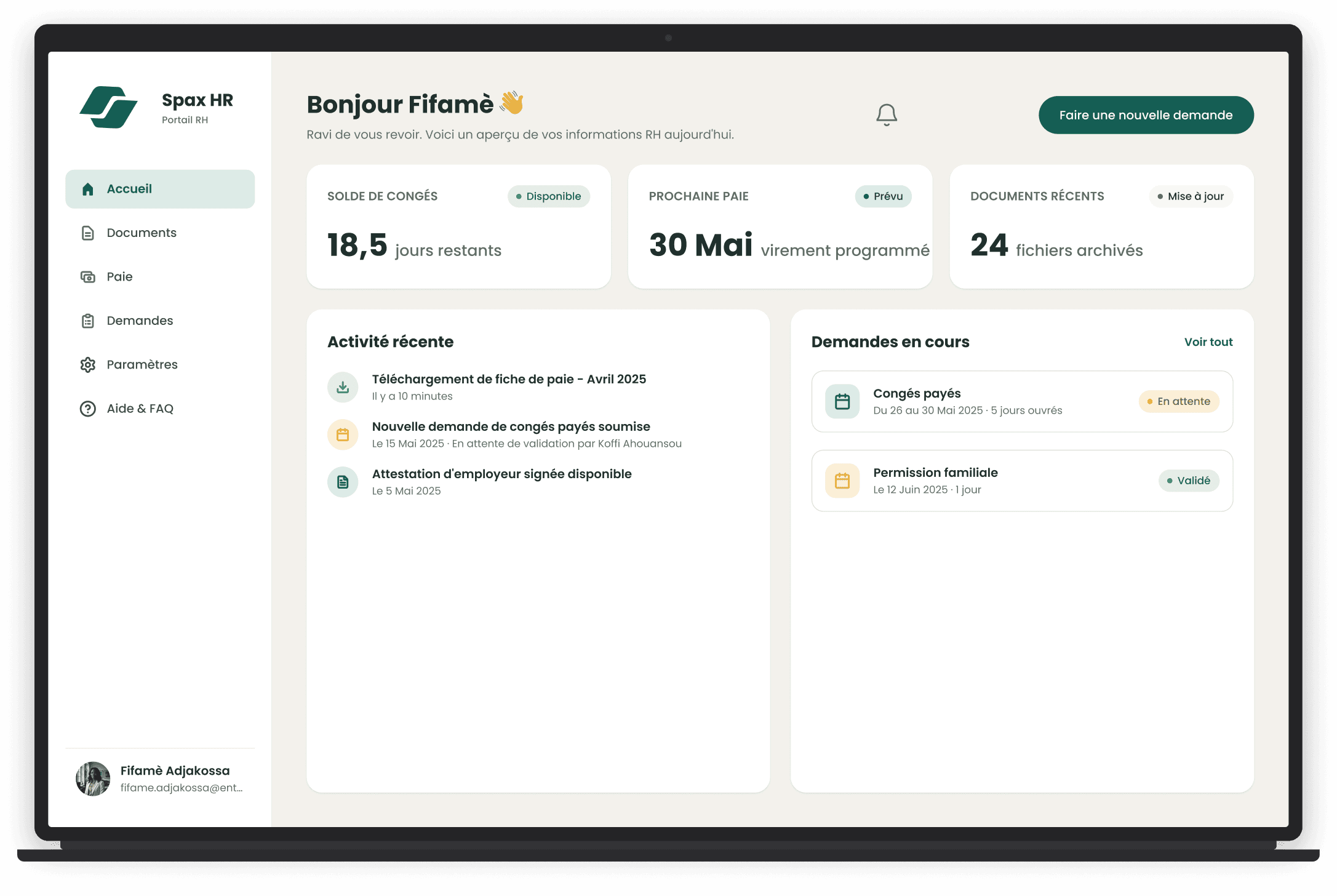
Final design: built for mobile, it also opens on a computer
FINAL THOUGHTS
Spax HR shows, on a prototype, that a portal reduced to the bare essentials is enough to make employees autonomous.
What I learned: the barrier isn't technical but psychological: employees need to be “allowed” to do things on their own. A transparent summary (balance after the request, approver, timing) removes anxiety before sending, and removing all manual calculation is what tips adoption.
Next steps: extend testing to other companies, then design the approval workflow on the manager side, the first gap left outside the MVP.
Limitations: a concept project, tested on a prototype with 8 participants in Cotonou. The drop in HR requests remains a projection, to be measured in real conditions.